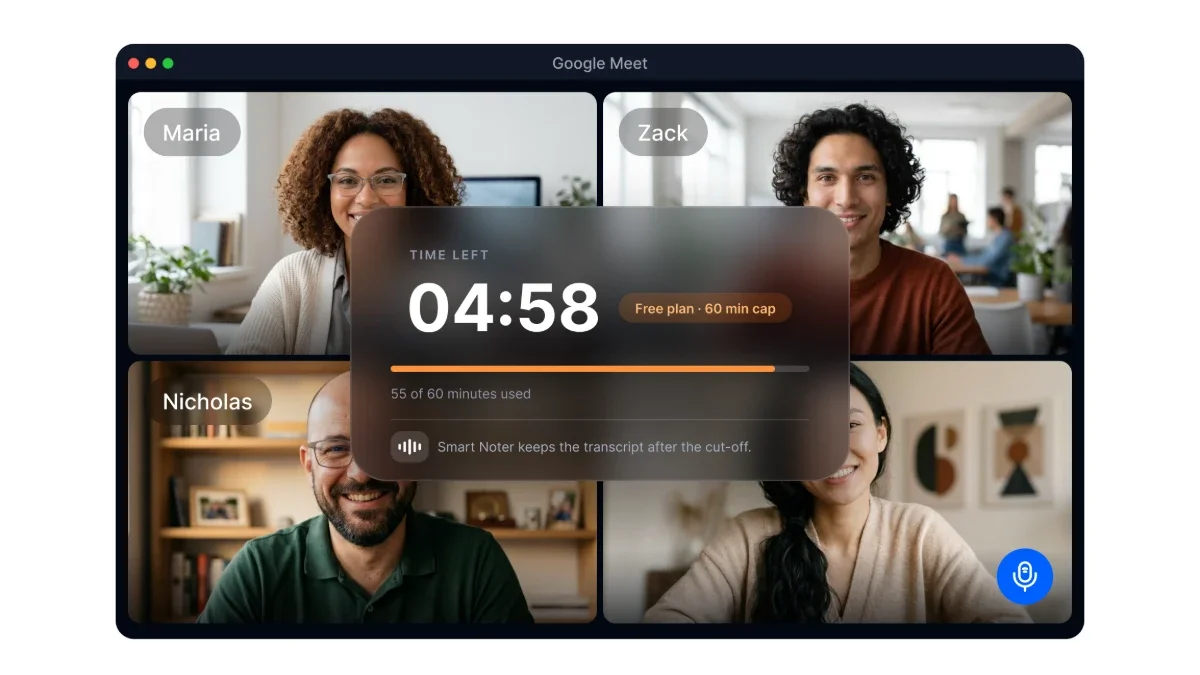
These are limits for a continuous call, not for the calendar event around it. A two hour event on your calendar does not give a free group call two hours of connection time. On the other hand, a meeting with a 30 minute calendar slot can continue beyond that scheduled end time if the account allows it.
So, does does google meet have a time limit have a simple answer? Yes, but the exact duration changes based on the host, the number of participants, and how people join. Since platform requirements can change, confirm these figures in Google’s current Meet documentation before publishing.
The Three Participant Rule
The 60 minute rule starts when a third person joins a call hosted by a free personal account. It does not matter whether the calendar invitation was created for two people or a larger group. What matters is the number of people connected at that moment.
Imagine you start a 90 minute coaching call with one client. At first, it qualifies as a two person meeting, but an assistant joins 20 minutes later to answer a question. The call then becomes a google meet group call with three participants, and the group duration rule applies.
The meeting host decides which account allowance applies to the room. A participant with Google Workspace or Google One access cannot extend a meeting hosted through another person’s free personal account. If the meeting needs more than an hour, set the eligible account as host before sending the invitation.
This is also the answer to do google meet calls have a time limit when attendees use different account types. The room does not assign a separate allowance to each person. Everyone follows the limit set by the host and the current participant count.
What Happens When the Time Limit Is Reached
Google Meet shows a warning near the end of a free group call. Current references place that warning at around the 50 minute mark, although some sources state 55 minutes. Check Google’s own Meet requirements page before publication to confirm the current warning timing.
That notice gives you a short chance to finish the current point, confirm next steps, and tell everyone whether they should rejoin. Once the 60 minute cap is reached, the call ends for all participants. There is no grace period for one final comment or decision.
Anything relying on the live connection stops when the room closes. Participants need to reopen the meeting, reconnect, and pick up the discussion again. That may take only a few moments, but it can interrupt a presentation, screen share, or sensitive conversation at exactly the wrong time.
You can reduce the disruption by setting up your meeting workflow through integrations before the call starts. Calendar and conference connections help keep meeting capture tied to scheduled sessions. It is much easier to prepare this in advance than while everyone is waiting to rejoin.
How to Keep a Long Meeting Going
The simplest way around the google meet 60 minute limit is to rejoin the room. A Google Meet link does not usually expire when an active call reaches its cap, so participants can return through the same link. The new connection starts a fresh session under the same account rules.
Let attendees know this plan at the beginning of the meeting and keep the link easy to find. When the warning appears, finish the current point, remind everyone to rejoin, and leave before the call cuts off. A little preparation prevents the familiar confusion of people wondering whether the meeting is actually over.
For a longer workshop, you can split the session into blocks and schedule a break close to the hour. That pause gives people time to stretch, get a drink, or check messages before returning. If interruption is not an option, the host can use an account type that supports the needed duration, while a conversation reduced to two people may continue under the one to one limit.
Phone participants have a separate eight hour connection limit, even if the online meeting can continue longer. This dial in limit means a caller may need to reconnect while others remain in the room. Include phone access in your planning when the meeting is expected to run for several hours.
If your discussion will span more than one session, arrange recording before it begins. A captured record gives you something concrete to check after everyone reconnects. Make sure you follow your organization’s policies and any applicable consent requirements.
Planning a Meeting Around the Limit
For a free group call, treat the first 50 minutes as working time. Keep the final stretch for confirming decisions, assigning responsibilities, and explaining whether people should rejoin. This leaves less chance that an important outcome gets pushed into the cutoff.
Put the hardest decisions near the start rather than saving them for the end. Status updates and lower priority items can wait until later in the agenda. If one topic takes longer than expected, you still have time to settle the meeting’s main question.
A recurring workshop that never fits inside an hour needs a consistent format, not a new workaround each week. You can divide the agenda into focused blocks, build in a formal break, or use a host account that supports the full google meet duration. Whichever approach you choose, explain it in the invitation so no one is caught off guard.
Written records also make it easier to continue after a break. Transcription preserves the discussion as searchable text, while Smart Noter can turn meeting speech into structured documentation. Before the next session starts, you can review the exact exchange instead of relying on scattered notes and memory.
What Actually Breaks When a Call Is Cut Off
Rejoining may take less than a minute, but the thread of the conversation can disappear much faster. Someone loses their train of thought, an objection goes unanswered, or the group forgets the point that led to a decision. That lost context often matters more than the interruption itself.
The problem gets worse when everyone assumes there will be time to write things down later. A participant may mention a condition that changes the decision, yet no one records it before the room closes. After reconnecting, people may remember the topic but not the reasoning behind it.
A continuous written record helps reduce the cost of that interruption. Smart Noter transcribes the discussion, identifies speakers, and adds timestamps, so you have a reference point when the room opens again. Instead of asking everyone to reconstruct the last few minutes, you can check what was said before the cutoff.
Smart Noter also creates meeting summaries that organize key topics and action points. That is useful when a workshop becomes two connected sessions or when one attendee cannot return after the break. The discussion remains available for review even when the participant list changes.
A longer account allowance does not solve the recordkeeping issue on its own. Every meeting ends eventually, and important reasoning can still disappear after a 24 hour call if nobody captures it. Good meeting documentation protects the substance of the conversation, not just its duration.
The google meet time limit is rarely the only constraint that matters. A clear reconnection plan protects your schedule, while Smart Noter helps preserve the decisions and context that make the meeting worthwhile. Prepare both before the call, especially when your agenda is close to an hour.